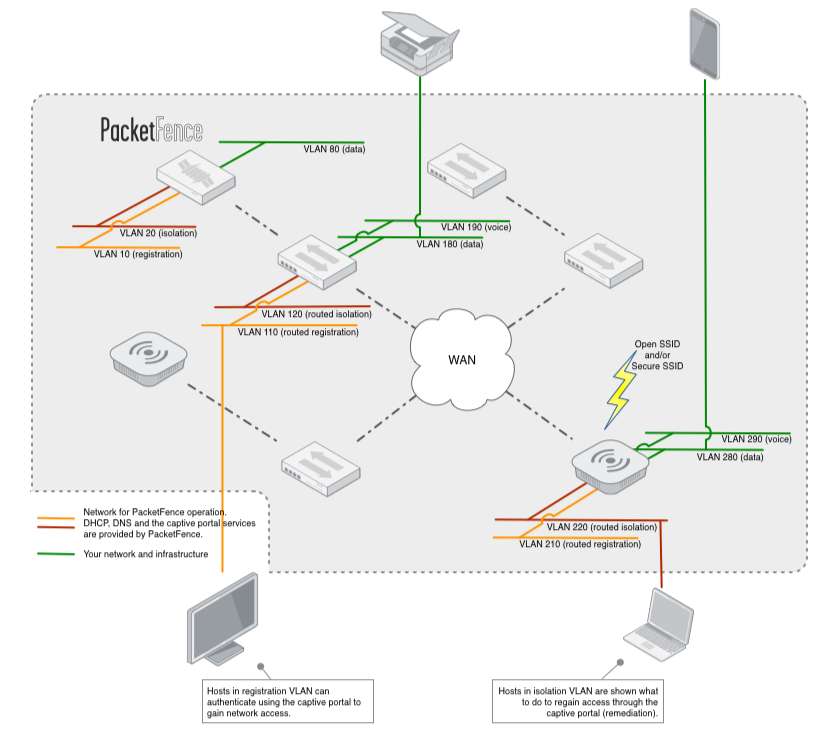
The solution is built around the concept of network isolation through VLAN assignment. For more details on how this work see the Technical Introduction page. Because of its long experience and several deployments, the VLAN management of PacketFence grew to be very flexible over the years. Your VLAN topology can be kept as it is and only two new VLAN will need to be added throughout your network: registration VLAN and isolation VLAN. Moreover, PacketFence can also make use of roles support from many equipment vendors.
VLAN and roles can be assigned using the various means:
- Per switch (default for VLAN)
- Per client category (default for roles)
- Per client
- Using any arbitrary decision (if you use our perl extension points)
Also, the per-switch method can be combined with the others. For example, with a default PacketFence setup, a VLAN or a role can be assigned to your printers and your PCs (if categorized properly) based on what equipment they are connected to. This implies that you can easily have per-building per-device type VLANs.
Nowadays, most organizations deal with a lot of consultants from various companies on-site that require Internet access for their work. In most cases, an access to the corporate network is given with little to no audit of the individual or device. Also, it is rarely required that they have access to the internal corporate infrastructure, it is done that way to avoid administrative burden (per-port VLAN management).
PacketFence supports a special guest VLAN or role out of the box. If you use a guest VLAN, you configure your network so that the guest VLAN only goes out to the Internet and the registration VLAN and the captive portal are the components used to explain to the guest how to register for access and how his access works. This is usually branded by the organization offering the network access. Several means of registering guests are possible:
- Manual registration of the guests
- Password of the day
- Self-registration (with or without credentials)
- Guest access sponsoring (employee vouching for a guest)
- Guest access activated by email confirmation
- Guest access activated by mobile phone confirmation (using SMS)
- Guest access activated through a Facebook/Google/GitHub authentication
PacketFence does also support guest access bulk creations and imports. PacketFence also integrates with online billing solution such as Authorize.net, PayPal, Stripe and more. Using this integration, you can handle online payments, required to get proper network access.
PacketFence supports the concept of portal profiles. A portal profile defines the registration workflow that will be used, together with registration and remediation pages.
With PacketFence, you can define different portal profiles based on a VLAN or SSID attribute. That means, for example, that you could define different portal profiles for your wired and wireless networks. Or, you could define per-SSID portal profiles.
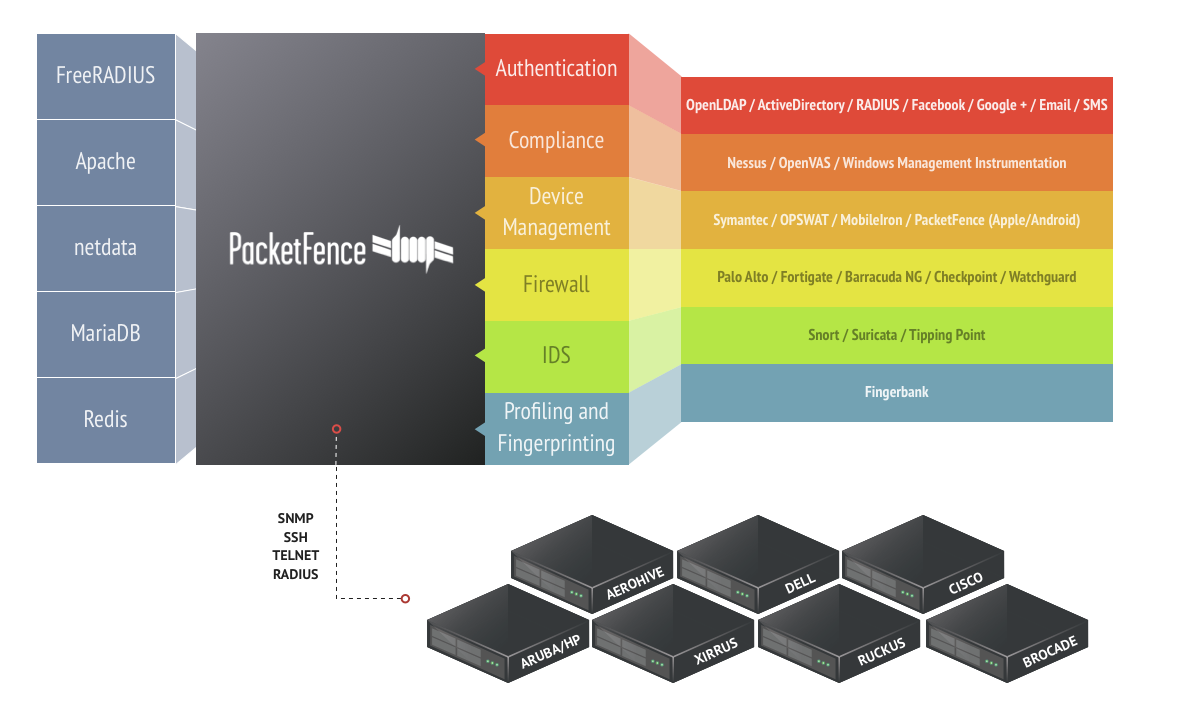
Looking at automatically blocking particular devices on your network? PacketFence is for you. In addition to Snort, Suricata, OpenVAS or Nessus as a source of information, PacketFence can combine the following detection mechanisms to effectively block network access from those unwanted devices :
-
PacketFence can block devices based on their DHCP fingerprint. Nearly every operating systems out there have an unique DHCP fingerprint. PacketFence can make use of this information and block network access from those devices. Based on DHCP fingerprints, you could automatically block, for example:
- Sony PlayStation devices or any other game consoles
- Wireless access points (WAPs)
- VoIP phones
-
PacketFence can block devices based on the provided User-Agent when those particular devices perform network activity using their embedded Web browser. Using this, you could automatically block, for example:
- Apple iPod or iPhone devices
- Everyone using an old Microsoft Internet Explorer (IE) release
-
PacketFence can block network access to devices having a specific MAC address pattern. Using this, you could automatically block, for examples, all devices from a specific network vendor.
Because most networks in production are already very large and complex, PacketFence provides several means to automatically register a client or device.
-
A network device (Switch, AP, Wireless Controller) can be set to automatically register all the MAC addresses that request access to the network. Very helpful for a transition into production.
-
DHCP fingerprinting can be used to automatically register specific device types (eg. VoIP phones, printers).
-
The vendor portion of a MAC address can be used to automatically register devices from a vendor. For example, all Apple products could be automatically registered using such a rule.
-
Snort, Nessus, OpenVAS, Browser User-Agent and even more techniques could also be used to automatically register devices.
PacketFence does support EAP-TLS for certificate-based authentication. PacketFence provides a small PKI solution that can be used to generate a TLS certificate for each device, or each user. PacketFence also integrates with Microsoft's PKI solution. PacketFence will make use of the Simple Certificate Exchange Protocol (SCEP) to talk to Microsoft's Network Device Enrollment Service (NDES) to create the appropriate certificate during an endpoint onboarding process.
The access duration to the network can be controlled with configuration parameters. It can either be an absolute date (eg. "Thu Jan 20 20:00:00 EST 2011"), a window (eg. "four weeks from first network access") or as soon as the device becomes inactive. On expiration registered devices become unregistered. With little customization it is also possible to do this on a device category basis. Expiration can also be manually edited on a per-node basis.
PacketFence provides device management and provisioning capabilities through its integration with complementary solutions.
These solutions which normally include an agent, allow compliance checks, settings being pushed and more on endpoints connected to your network. PacketFence can make sure the agents (or clients) are installed during the registration process, and afterwards for every new connection.
PacketFence supports the following solutions such as
MobileIron, Microsoft Intune, JAMF, Kandji and more.
Finally, PacketFence provides its own configuration agents for Android, Apple and Windows-based endpoints.
Please see our quick guides to integrate PacketFence with these solutions.
PacketFence provides Single-Sign On features with many firewalls. Upon connection on the wired or wireless network, PacketFence can dynamically update the IP/user association on firewalls for them to apply, if required, per-user or per-group filtering policies.
PacketFence supports the following firewall
solutions, among many others:
Please see our quick guides to integrate PacketFence with these solutions.
PacketFence can automatically track the amount of bandwidth devices consume on the network. With its built-in violations support, it can quarantine or change access level of devices that are consuming too much bandwidth during a particular time window. PacketFence also has reports on bandwidth consumption.
A Floating Network Device is a Switch or Access Point (AP) that can be moved around your network and that is plugged into access ports. Once configured properly, PacketFence will recognize your Floating Network Devices and will configure the access ports appropriately usually allowing multiple VLANs and more MAC addresses. At this point, the Floating Network Device can also perform network access through PacketFence or not. Once the device is disconnected PacketFence will then re-configure back to its original configuration.
PacketFence can authenticate your users using several protocols/standards. This allows you to integrate PacketFence in your environment without requiring your users to remember yet another username and password. Supported authentication sources are:
-
- Microsoft Active Directory
- Novell eDirectory
- OpenLDAP
- ... or any LDAP-compliant server
-
- Cisco ACS
- RADIUS (FreeRADIUS, Radiator, etc.)
- Microsoft NPS
- ... or any RADIUS-compliant server
-
- Facebook
- Google
- GitHub
- LinkedIn
- Microsoft Live
- Twitter
Moreover, PacketFence can also use its internal SQL database to authenticate locally-created users.
PacketFence integrates very well with Microsoft Active Directory. A PacketFence server can even be joined to multiple Active Directory domains - without needing to establish a trust between them.
Finally, PacketFence exposes Web services that can be used by Windows PowerShell scripts. PacketFence includes scripts to automatically unregister devices belonging to users being removed in Active Directory or for whom the account was locked.
PacketFence's architecture allows it to work over routed networks. The server can be located in your datacenter and can still effectively secure branch offices.
Because of the intrusive nature of network access control, PacketFence comes with finely-grained controls when it comes to deployment. As described elsewhere, you can automatically pre-register nodes but you can also control on a per-switch and per-port level wether or not should PacketFence perform its duties. This enables you to deploy at the speed you want, per-switch, per-floor, per-location, etc.
The same level of control is also available on the isolation features. At first, you can only log on violation events. Then, as you feel more familiar with who would be isolated and validated against false-positive, you can enable VLAN isolation.
Together, these two features makes the deployment of a PacketFence as easy as it could be.
PacketFence can be configured to allow access to specified resources even when the node is in isolation. This allows you to give access to specific tools or patches through the captive portal.
PacketFence is developed with high-availability in mind. Multiple PacketFence servers can be part of an active/active cluster - sharing load for massive horizontal scalability. All our deployments are made using high-availability so the solution is proven in that regard. Information on how to configure PacketFence in that mode of operation is available in our Clustering Quick Guide.
PacketFence supports hardware from several network vendors all in an integrated fashion. See the Supported Switches and AP page for the whole list. If you are a vendor and you would like to see your hardware supported contact us.
PacketFence is built using open standards to avoid vendor lock-in. Among the standards we support and use, there are:
- 802.1X
- Simple Network Management Protocol (SNMP)
- Standard SNMP management information base (MIB) like BRIDGE-MIB, Q-BRIDGE-MIB, IF-MIB, IEEE8021-PAE-MIB
- RADIUS
- Netflow / IPFIX
- Wireless ISP Roaming (WISPR)
PacketFence has a couple of extension points where you can override PacketFence's default behavior with a little bit of Perl code. The API has been designed to be easy to understand with only a couple of high-level entry points. Several examples are already there in the source code but commented. Also, when upgrading, PacketFence doesn't replace the files in the extensions points, this way you keep your modified behavior on upgrades.
The captive portal templates are also easily customizable with HTML and CSS knowledge. They are built using Perl's Template Toolkit.